Safer defaults for enterprise OpenClaw deployments
OpenClaw is an open-source AI agent framework that gives users the ability to run autonomous, tool-using agents connecting to files, browsers, APIs, and more. That scope of autonomy is exactly what makes it powerful and exactly why it needs to be deployed with care.
If your company is anything like ours, people have probably started coming to your security team in the past few weeks saying they want to try out OpenClaw.
Or just installing it without saying anything.
We didn't want to stifle experimentation, so we started piecing together what we believe to be a safer default deployment.
Why the default OpenClaw setup isn’t enterprise-ready
Out of the box, OpenClaw trades security for convenience. That’s fine for a solo developer experimenting on a personal machine. It is a real problem in an enterprise environment. Here’s what keeps security teams up at night:
- Overprivileged processes. The gateway runs with broad access to the host filesystem and user data by default. If the agent is compromised or simply misbehaves, it can read, modify, or exfiltrate files it has no business touching.
- No visibility. Default deployments produce little to no audit trail. When something goes wrong, security teams have nothing to investigate. In regulated industries, that is not just inconvenient, it is a compliance failure.
- Supply chain exposure. Pulling the latest version of OpenClaw on install means any compromised release ships straight to your users. There’s no buffer between a bad update and production.
- Credential sprawl. When agents are granted access to messaging platforms, email, or cloud services using a user’s personal credentials, the blast radius of any incident scales with the permissions of that account.
How we made it safer without making it painful
At UiPath, we believe security and productivity are not a trade-off. They are a design challenge. So instead of blocking OpenClaw, we re-engineered how it gets deployed. Our solution is a one-command VM that applies hardened defaults from day one, giving teams the AI-powered productivity boost they want without handing over the keys to the kingdom. Here’s how each problem gets addressed:
- Process isolation via SystemD sandboxing. The gateway runs as a dedicated unprivileged user. Filesystem writes are locked to its own data directories. Home directories, /dev, and other processes are completely hidden from it.
- Observability via FluentBit and Azure. Every log is shipped continuously to a scoped Azure Blob. Security teams always have a record. Credentials are never persisted on the running machine. Tokens are issued per user and expire automatically.
- A version buffer against supply chain attacks. We install OpenClaw via pnpm with a deliberate delay on updates. This gives the community time to catch and report compromised releases before they land in your environment.
- Scoped credentials, not personal ones. We recommend using dedicated accounts for any platform OpenClaw interacts with. If an agent goes rogue, the damage is bounded by the rights of a limited service account, not a real employee’s full access.
Our requirements going in:
- Better separation of OpenClaw from other user data.
- Observability into what OpenClaw was doing in case of an incident.
- Not too much friction and manual setup necessary compared to a default deployment.
What we shipped was a virtual machine that users can spin up with one command and whose logs are ingested continuously into Azure.
If you're just interested in running this yourself, or taking a look at the code, go to the repository and follow the installation instructions. If you want to learn more about our approach, follow along.
Architecture
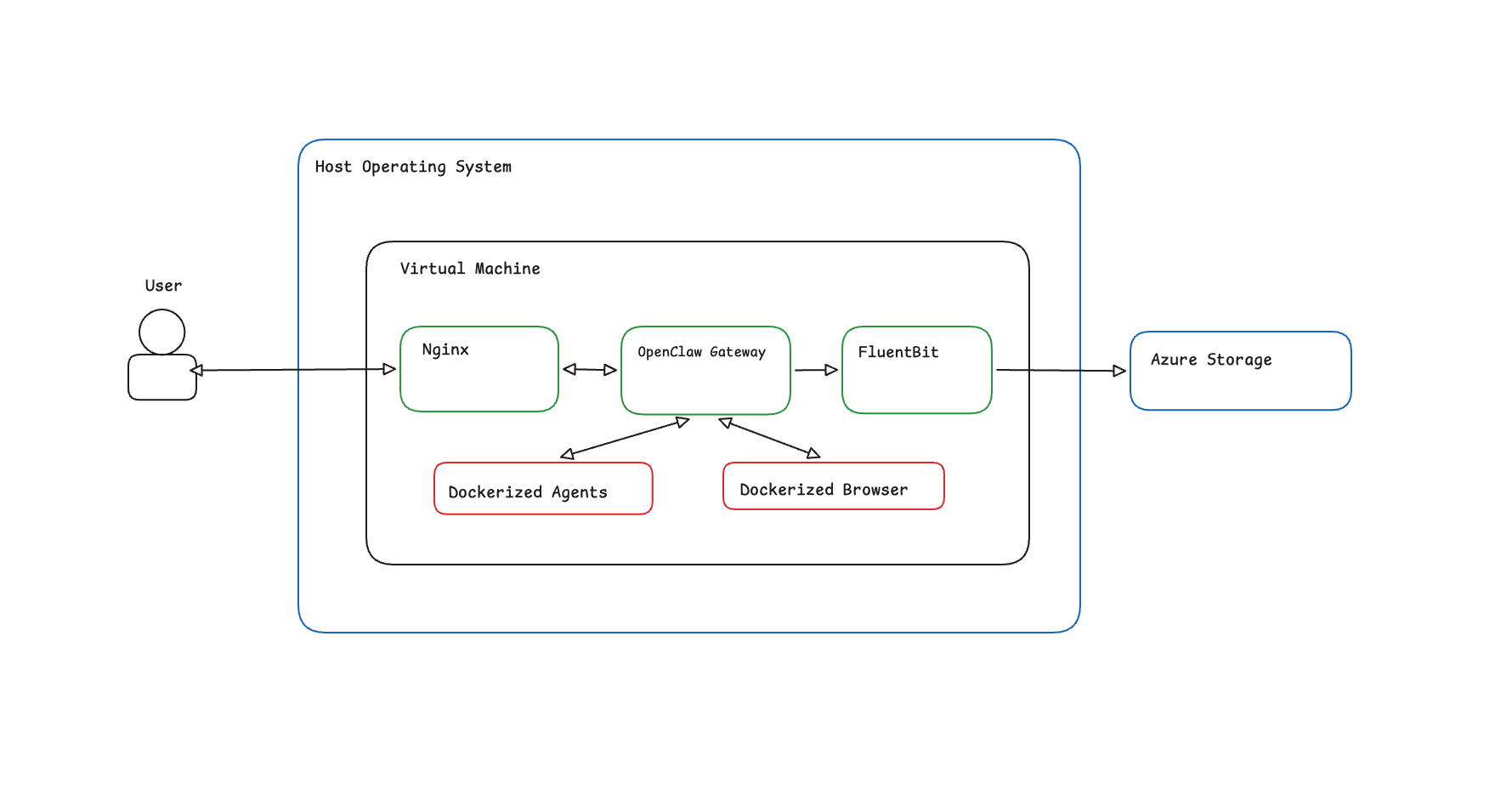
On a high level, the system layout is the following:
- The OpenClaw Gateway process runs as a SystemD unit, under a different user and with some capabilities removed.
- A FluentBit daemon collects the logs and pushes them to an Azure Blob using the identity of the user that spun up the machine.
- An Nginx reverse proxy sits in front of the gateway and blocks requests when the token used for log ingestion has expired. We'll talk about why we chose this approach when we dive deeper into each component.
Everything is packaged together using Vagrant for ease of deployment and we use Task to provide users with a minimal interface for interacting with the machine.
The Gateway
First, the installation: we installed OpenClaw via pnpm so we can delay the latest version available for updates by a few days. In case of a supply chain attack, our hope is that this buffer will guard the users until the issue is fixed.
As we said before, the gateway runs as a SystemD service under a dedicated openclaw user. If the gateway process is compromised, we've used some of the sandboxing options made available by SystemD to greatly limit access to other parts of the system:
ProtectSystem=strict, mounts the filesystem as read-only except for the data directories of the process and/dev/,/proc/, and/sys/. The process can write to/var/lib/openclaw,/tmp, and a few more — and nothing else.ProtectHome=yesmakes/home,/root, and/run/userinaccessible.PrivateDevices=yesremoves access to/dev.PrivateTmp=yesgives the process its own/tmp, so it can't read temp files from other processes.NoNewPrivileges=yesmakes sure that the children of this process can't gain new privileges.RestrictNamespaces=yesprevents creating new namespaces.ProtectControlGroups=yesmakes the cgroup filesystem read-only.ProtectProc=noaccessandProcSubset=pidhide other processes in/proc, limiting reconnaissance after a compromise.
With all that being said, we've had to execute this unit as part of the docker group, which can be easily escalated to root on the virtual machine. Access to docker was necessary so we could sandbox agents, tools, and the browser inside containers. We feel that this is a decent compromise given that we are running inside a VM, but we are open to exploring rootless docker/podman setups.
On the application side, we tried to disable most of the functionality and enable all the sandboxes that OpenClaw makes available at the time of writing.
We expect you to have an honest conversation with your teams and explain to them that they should exercise caution and common sense when enabling features and giving agents the right to perform actions on their behalf. As a rule of thumb, read-only is preferred and will provide a good-enough productivity boost. If you insist on write rights (e.g. sending messages/emails to other people), we recommend creating a separate dedicated account for OpenClaw under that platform. This way if it does modify things or does any kind of damage, it should be limited by the rights and resources of that account, not yours. Exercise caution in the power you give it.
Philosophy aside, here's a high level overview of what we changed in the config:
- the gateway authentication token is injected into the config via an environment variable, which is regenerated every time the service restarts.
- logging level is set to trace, so we have the maximum amount of visibility offered by the application ingested into Azure.
- we disabled every messaging channel by default apart from the web app. Enable back only what is necessary.
- plugins are disabled
- agents and tools are sandboxed inside separate containers.
- the browser is enabled as it is a valuable tool for pulling up to date information.
- agent to agent communication is disabled
The Logs
We used fluent-bit for log ingestion due to its support of a vast number of input sources and output destinations. For our particular use case we ingest logs into Azure Blobs, but configuring it for any other supported output destination should be pretty straightforward.
When the virtual machine is provisioned, we install the azure cli and fluent bit, but azure credentials are not persisted while the machine is running. Instead, we follow this process:
- prompt users to log into Azure after the VM boots
- issue a SAS token with write rights scoped to a specific Blob Container for each user. All the logs for this user will be written here.
- logout of the azure cli.
This way we ensure that no valid azure credentials are left on the machine while it's running.
The Reverse Proxy
The SAS we generated at step 2 above will expire after a maximum of 7 days. This represents an issue because we expect this VM to be long-lived.
To solve this, we block access to the gateway with a short Lua script that tries to read the stored SAS (if it exists) and checks if it is about to expire. If it is, the user is presented with an HTML page instructing them to run a single command that will generate a new valid token.
The “user-interface”
We’ve exposed a small set of commands to interact with the VM and the openclaw service by using a Taskfile. At the time of writing, users can:
approve-device: Get the list of pending approvals and approve the connection of a device to OpenClawcreate: Sets up and starts the OpenClaw Virtual Machinedestroy: Destroy the OpenClaw Virtual Machinedown: Suspends the OpenClaw Virtual Machinelogin: Get the OpenClaw authentication URL (aliases: auth)restart: Restart the openclaw Virtual Machinesetup-models: Setup API keys for any model providershell: Get a terminal session to interact with the OpenClaw service using the CLIup: Start the openclaw Virtual Machinelogs:dump: Dump the logs of OpenClaw to a filelogs:tail: Connect to the log stream of OpenClaw
Further improvements
There are some improvements that can be made to the project:
- Improve the visibility inside the VM by monitoring all network traffic.
- Instead of a Vagrant file that builds the image locally, use Packer to build Vagrant Boxes, Azure VM Images and variants for other cloud providers. This way we can deploy instances both locally and in cloud environments where we have better visibility over resources.
- Add some security features that address the AI layer, not just the application layer.
Think you can help with any of that? We welcome PRs from the larger community.
Some ending thoughts on the security of AI-generated apps
Agents are everywhere. Even if model improvements were to stop today, they are here to stay.
One can expect that the pace of releases and hype of such products is going to increase. The problem is that security comes as an afterthought, but it doesn’t have to be this way.
Just as the cost of code generation is going to become negligible, so is the cost of secure code. A security minded agent can be introduced anywhere in the development cycle: research, planning, review. There are already skills/plugins that can help with this: code review plugin, security scan.
We think the results will be night and day.